Handbook · Foundations · 7 min read
Core systems: inbox, priorities, review
A head full of tasks overheats like a processor with twenty programs open. Three pillars — external storage, prioritization and regular review — free it up.
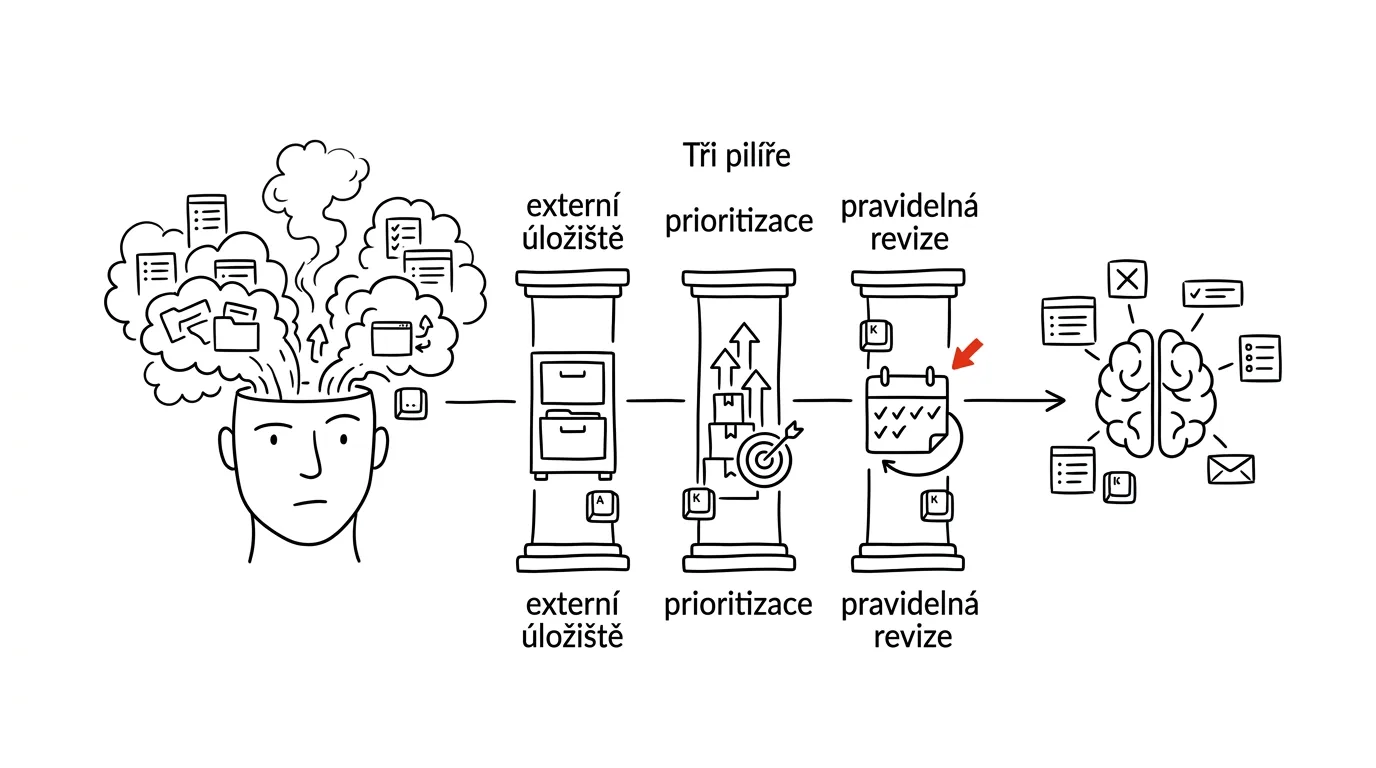
Do you know the feeling of having a head full of tasks and no idea where to start? Or lying awake at night while your brain reminds you of everything you haven't finished? You're not alone — and there is a fix.
Why you need a system
Think of your brain as a computer's processor. Open too many programs at once and it slows down and overheats. That's exactly what happens when you try to hold every task, deadline and idea in your head. Without a system you forget important things, deadlines stress you out, work piles up — and in the evening you can't “switch off.”
The three pillars of an effective system
- 1External storageOne inbox for everything. Your brain is for having ideas, not storing them.
- 2PrioritizationThe Eisenhower matrix: important vs. urgent.
- 3Regular review5–10 minutes daily, 30 weekly. Otherwise the system dies.
1. External storage (the inbox)
Pick one tool for capturing tasks — paper or digital — and write down everything, including things that seem trivial. Then go through the storage regularly and sort it.
From experience: For a long time I used a combination of a paper planner, a digital calendar and sticky notes on my monitor. The result? Chaos. Today everything lives in one system and I finally have order.
2. The Eisenhower matrix
Not all tasks matter equally. You need a way to tell what's genuinely important from what can wait. The matrix does the sorting for you:
Kvadrant „Důležité, neurgentní" je místo, kde vzniká skutečný pokrok — plánujte si pro něj čas dřív, než ho urgence sežerou.
3. Regular review
A system is only as good as how often you update it:
How to work with the matrix in practice:
- Important + urgent = do it now. Crises, deadlines, urgent problems. You can't dodge this quadrant — but you can shrink it.
- Important + not urgent = schedule it. Strategic projects, personal growth, preventing problems. This is where real progress happens — and without scheduling, this quadrant always loses to whatever is urgent.
- Not important + urgent = delegate it. Some meetings, some emails, interruptions from colleagues. Urgency is not the same thing as importance.
- Not important + not urgent = eliminate it. Procrastination, pointless meetings, social media during work hours. Cut it without guilt.
Getting started: the first steps
- Clear your head. Take paper or a digital note and write down absolutely everything you're carrying around — tasks, ideas, projects, commitments, things that stress you out. Don't stop until your head is empty; typically that's 50–150 items, and the relief is physical.
- Build your system. Pick a tool — digital (Todoist, Things, Microsoft To Do), analog (bullet journal, planner), or a combination. Then set up the basic categories: Projects, Personal, Work, Someday/Maybe.
- Put routines in place. Morning planning (10 minutes), evening review (5 minutes), weekly overview (30 minutes). Routines are what turn a list into a system.
Common obstacles
“I don't have time to get organized.” Start with 5 minutes a day. A simple system you actually use beats a perfect one that's too complicated.
“I forget to check my lists.” Attach the check to an existing daily routine — your morning coffee, for instance.
“I have too many tasks.” The important/urgent matrix plus learning to say no.
How you'll know it's working
- Less stress at bedtime.
- Fewer forgotten tasks.
- More projects finished.
- A better overview of your own commitments.
- More time for what matters — because the system holds the overview, not your head.
There's no such thing as a perfect system — only a system that works for you. In the chapters ahead we'll look at specific methods (GTD, Inbox Zero, time blocking and more) as well as the tools that will help you digitize and automate your system.
Related tips
Batch similar tasks: emails with emails, calls with calls
Switching between types of work costs energy. Grouping similar tasks into blocks saves dozens of minutes a day.
The Todoist Inbox: everything goes in, sort it out later
Ideas and tasks drop into your Inbox without a second thought about where they belong. Once a day, you empty it — into projects, or into the trash.
Three tasks for the day: pick in the morning, check in the evening
Not a list of twenty items, but three things that absolutely must get done today. Everything else is a bonus.
The weekly review: 30 minutes that run your whole week
On Friday or Sunday, go through your calendar, tasks, and notes — close out loose ends, plan three priorities. Monday starts with clarity.
Want to keep the momentum?
One tip from the handbook by email each week — in an order that makes sense.
1 tip a week · no spam · unsubscribe in one click