Tips & tricks · Gear · Everywhere · nerves · 3 min read
Cable order in a minute: a clip on the edge of the desk
Last reviewed:
In this article
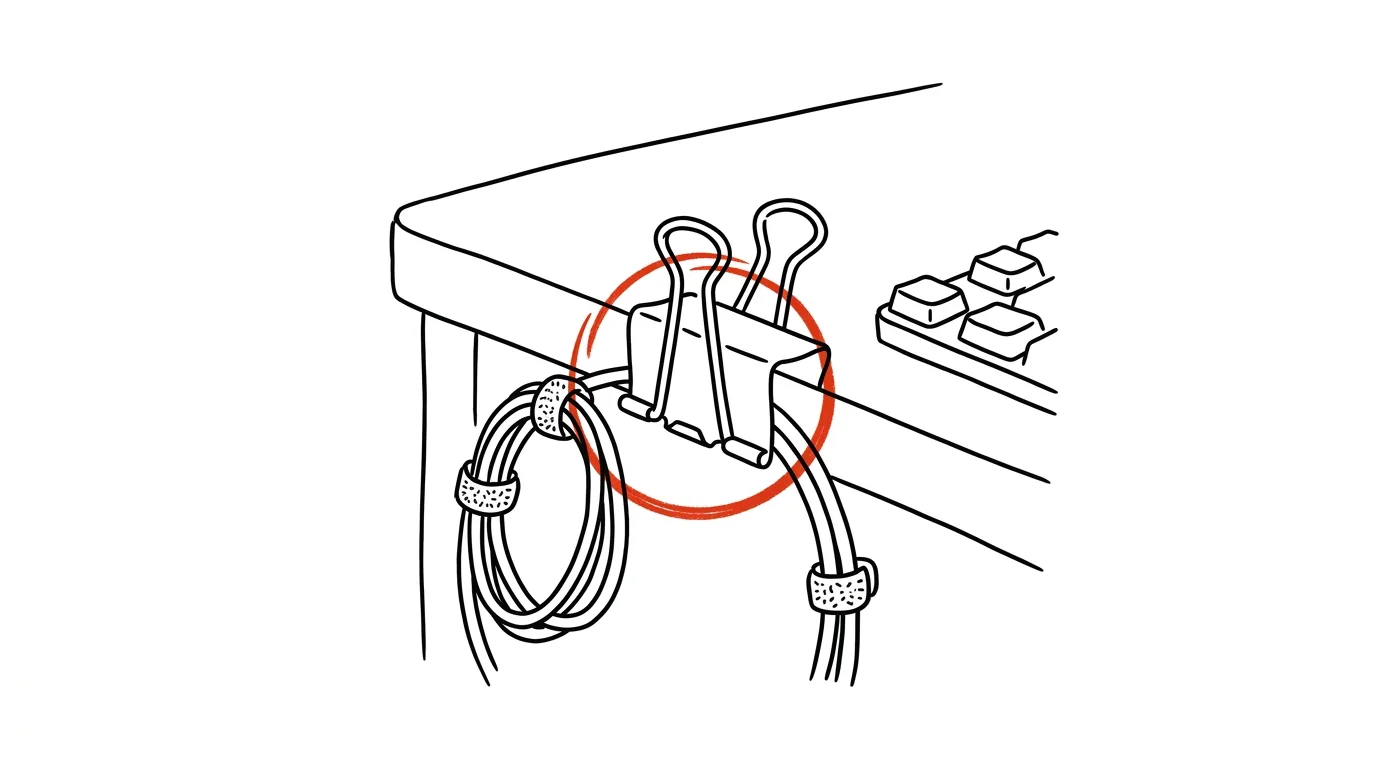
You unplug the charger, the connector slides off the desk, and disappears into the gap between the desk and the wall. You fish for it on all fours, bang your head on the desktop, and repeat tomorrow. This scene plays out in thousands of home offices every day, and yet it has a fix that costs almost nothing and takes a minute: a stop that the cable simply can't fall past. The simplest version that actually works is an ordinary office binder clip — the black spring-loaded clamp for paper.
How to do it
- Take a binder clip and clip it onto the edge of your desk near the spot where you plug and unplug cables most often.
- Thread the cable through the clip's wire loops. The connector is wider than the gap in the loop, so after you unplug it, the cable stays hanging right there on the edge of the desk — exactly where you'll plug it back in tomorrow. For thicker cables, pop one side of the loop open, thread the cable through, and snap it back. If you'd rather buy a ready-made solution, adhesive cable clips work on the exact same principle.
- For cables you never unplug (monitor, dock, lamp), bundle them together with reusable cable ties — unlike zip ties, you can undo them any time you reconfigure your setup. The bundled cluster then falls behind the desk only once, neatly, and for the last time.
- Stick or screw your power strip to the underside of the desk so it's not lying on the floor in a cloud of dust — double-sided mounting tape is enough. Half your visible cables vanish instantly.
- Label your chargers and adapters: a strip of tape with "laptop 65W," "monitor," "phone." The household stops arguing over whose charger is whose, and you pack for trips with certainty instead of a guessing game.
A typical scenario
Developer Alex plugs a USB-C cable from a dock into his laptop every morning and unplugs it every evening. The cable used to fall twice a week, and Alex would grope around under the desk among the dust and surprises. A clip on the edge of the desk ended that ritual: the cable now hangs in its spot, and plugging in is a one-second, no-look motion. He bundled the rest of the cables with reusable ties and stuck the power strip under the desktop — a cleanup that took ten minutes and lasted years.
What you get out of it
A small but daily frustration disappears, and the desk looks tidy — which isn't just about looks: less visual clutter means fewer distractions. When you clean or reconfigure the desk, you'll appreciate that the cables form neat bundles instead of a Gordian knot. And labeled chargers put an end to the morning arguments over who "just borrowed" whose adapter — every piece has a name and a home.
Pro tip
If you plug in more than one cable a day, the clip is only a stopgap — the permanent fix is a single cable for everything, see the tip on dock stations. Then you only need one clip: for that single cable from the dock.
Want to go deeper? The handbook has a whole chapter on it — The complete guide to an effective home office.
Similar tips
Win+E: File Explorer instantly
Win+E
A new folder, finding a file, copying — it all starts with File Explorer. Open it with a shortcut, not by hunting for an icon.
Win+H: dictate instead of typing
Win+H
Voice typing in Windows works in your language and starts wherever the cursor is blinking. Dictate a first draft of an email in a third of the time.
Win + L: lock your computer every time you step away
Win+L
The fastest security habit there is. One keypress and nobody can see what you're working on.
Was this helpful?
Liked this tip?
I send one like it every week by email. Two minutes to read, hours saved.
1 tip a week · no spam · unsubscribe in one click