Tips & tricks · AI · Everywhere · ~hours of every colleague's time
Onboarding a new hire: a Project that answers for you
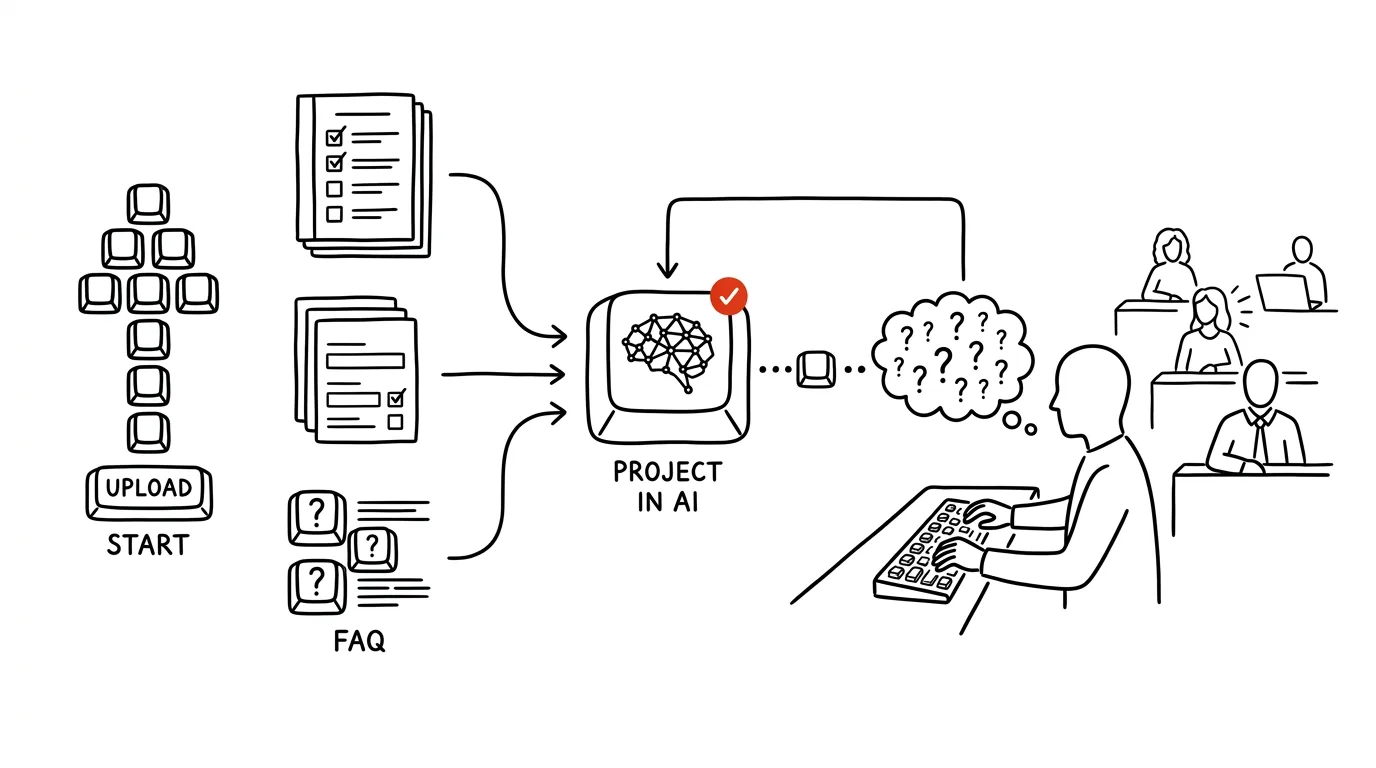
Bringing a new person onto a team costs more than anyone admits. A new hire doesn't know where anything is, and asks — rightly so, since otherwise they'd be guessing. But every question pulls someone else out of their work, and the answer is the same one it was last time. Then there's the other half of the problem: some questions the new hire never asks at all, because it's embarrassing to ask for the fifth time, and they get the thing wrong instead.
Most questions in the first few weeks have exactly one correct answer, and it's already written down somewhere — nobody just knows how to find it. That's exactly what a Project in AI solves: persistent context where you upload company procedures and instructions for how to answer from them. The new hire can then ask in their own words, anytime, without embarrassment and without waiting for a colleague to have a free moment.
This guide runs from choosing documents through writing the instructions and a new hire's first few weeks, all the way to measuring the payoff, quarterly maintenance, and extending the same setup to temp staff, contractors, and handovers when someone leaves. Every phase comes with copy-paste prompts — just fill in the brackets. Building the Project takes one afternoon; it starts paying off from the second new hire onward, when you're just topping it up.
A typical scenario
Tom is joining a twelve-person sales team. Manager Lucy already knows from past onboardings how this plays out: for the first three weeks, Tom asks roughly fifteen questions a day, and each one costs a colleague not just a minute to answer but another ten minutes to get back into focus afterward. Across the team, that's several hours a week. On top of that, Tom has the uncomfortable feeling that he's constantly bothering people, so on some things he'd rather not ask at all — and creates three orders with the wrong discount because he guessed at how approvals probably work.
This time, Lucy sets up a Project called “Sales Onboarding” before Tom starts. She uploads the order-creation policy, the price list with the discount rules, two sample proposals, the approval matrix, an FAQ gathered from the team chat, and an overview of who owns what. In the instructions, she specifies that answers should come only from the uploaded documents, and when something's uncertain, the Project should point to a specific person.
On day one, Tom asks “how do we create an order here?” and gets the step-by-step process, including who has to approve anything over a hundred thousand. He hasn't stopped asking colleagues — but now he asks roughly three times a day instead of fifteen, and mostly about things that aren't in the documents: context, exceptions, and “why do we actually do it this way.” Those are exactly the questions where a human conversation makes sense.
The side effect surprises Lucy more than the main one. After three weeks, the list of questions the Project couldn't answer has grown to twenty items — and it's the most accurate audit of company documentation she's ever had. Six of those twenty things weren't written down anywhere, just living in the heads of the two most senior colleagues.
Phase 1: what to upload, and what not to
The principle is simple and liberating: don't write anything new. If you start writing the documentation you've been putting off for years just because of the Project, you'll never actually launch it. Upload what already exists, even if it's incomplete and out of date in places — day-to-day use will show you the gaps on its own.
Six categories that cover the first month
- Procedures and policies. How to create an order, how to approve an invoice, how to report sick, how to order equipment. Informally written is fine, as long as it describes what actually happens.
- Wiki and internal documentation. Anything already living in Notion, Confluence, or a shared drive. Pick the subset relevant to the role, not the whole workspace.
- Templates. A sample proposal, a sample contract, the format for meeting minutes, a report structure. New hires learn fastest from a finished example.
- FAQ. The most valuable and most often overlooked category. There are two sources: what previous new hires asked you, and the team chat — a channel full of questions already contains the answers to eighty percent of what you'll need.
- Org chart and responsibilities. Who's who, who approves what, who to go to for what. This is also where the approval matrix with limits belongs.
- Context and glossary. Internal abbreviations, system names, what products get called internally. A new hire has no idea what “the E-thing” or “the big report” means, and nobody thinks to explain it.
Security: what must not go into the Project
This is a key step, not a formality. A Project should contain exactly the part of the documentation that anyone on the team would show a new hire without hesitation. Nothing more. Out go payroll and personnel files, performance reviews, trade secrets beyond the scope of the role, clients' personal data, access credentials, and contracts with sensitive terms.
Watch for two traps in particular. First: attachments and hidden tabs. A price list in spreadsheet form often has a margin sheet a new hire shouldn't see — and AI will read the whole thing. Open files and check what's actually in them before uploading. Second: emails and meeting notes that end up containing names and judgments about people; it's worth cleaning those up, or only uploading the part that describes the process.
And the other half of security: run the Project on a company account with contractual data protection, not in one manager's private free chat. There are three reasons for this — the data is under contract, access can be controlled by role, and if Lucy leaves, the Project stays with the company. A Project in a personal account leaves with her.
If you're unsure about scope, have AI run a check first:
Here's a list of the documents I want to upload into the onboarding
Project for a new [position] in [department]:

[paste the list of document names, one sentence per item on what it
contains]

Go through the list and split the documents into three groups:
1. SAFE — a new hire may see this from day one.
2. CHECK FIRST — likely contains a part that doesn't belong there
   (for each, note what specifically tends to be sensitive in a
   document like this, and what I should look for before uploading).
3. DO NOT UPLOAD — belongs elsewhere, note why for each.

Then write what you think is missing from the list for a new hire
in this position to find their footing in the first month.
Base this on the names and descriptions — don't guess at the actual
content of the documents.
The “check first” group is the useful one: it won't hand you a verdict, but it will tell you what to look for in that type of document before you upload it. The last paragraph tends to be valuable in a different way — it typically shows that your processes are beautifully documented and there's absolutely nothing written about how you communicate or what's expected of someone in the first month.
Phase 2: Project instructions
This is where the quality of the whole system gets decided. A Project is persistent context — uploaded files and instructions that AI knows in every conversation inside the project, so the new hire never has to explain them again. More on the mechanics in the tip on Projects and context.
Without instructions, you get a generic assistant that has some sense of your company from the uploaded files and fills in the rest with general knowledge about how orders are “usually” created. That's worse than nothing, because it sounds just as confident as the truth.
Instructions that actually work
Project instructions "Onboarding [department]":

You are a guide for a new colleague in the role of [position] at
[company]. You answer their questions about our procedures, tools,
and people.

Rules that always apply:
1. Answer EXCLUSIVELY from the uploaded documents. Don't use general
   knowledge about how this is usually done elsewhere.
2. For every answer, state which document you're drawing from.
3. When the answer isn't in the material, or is ambiguous, say so
   explicitly with the sentence "this isn't in our documents" and
   recommend who the new hire should ask (based on the
   responsibilities overview). Never guess or fill in a likely
   procedure.
4. Answer briefly and step by step. For procedures, number the
   steps and state who approves what and up to what limit.
5. When asked about anything with an approval limit or legal impact
   (discounts, contracts, exceptions, payments), always add that
   the final decision belongs to the person named in the approval
   matrix.
6. The new hire is new: explain internal abbreviations whenever you
   use them, and don't assume familiarity with our systems.
7. Never recommend working around a procedure, even if asked
   whether there's a faster way.

At the end of every answer, add the line: "Not sure? Ask
[owner's name] — and let me know so we can add it to the
documents."
Point 3 is the heart of the whole thing. Without it, AI will guess at a missing procedure and the new hire will never find out — that's the most dangerous failure mode, because it looks exactly like a correct answer. Point 5 holds to the principle AI proposes, the person approves: the Project is a guide, not an approval authority, and a new hire doesn't send off a pricing exception or a contract based on a chat answer.
The last line does two things at once: it gives the new hire permission to ask people, and it turns them into a collector of documentation gaps at the same time.
Verify it actually sticks to the instructions
Test the Project yourself before handing it to a new hire. The fastest test is to ask about something that isn't in the documents:
I want to test whether you're sticking to the instructions. Answer
these five questions and clearly flag for each one whether the
answer comes from the documents or not:

1. [a question the uploaded documents do answer]
2. [a question the documents do NOT answer, but that sounds like it
   obviously should — e.g. "what's our notice period"]
3. [a question where the documents make two different claims]
4. [a question about something with an approval limit]
5. [a question phrased the way a new hire would actually ask it,
   badly — write it colloquially and imprecisely]

At the end of every answer, write: SOURCE: [document name]
or SOURCE: not in the documents.
Question 2 is the decisive one. If you get a substantive answer instead of an admission that it's not in the material, the instructions aren't working — tighten point 3 and run the test again. Question 3 reveals whether the model quietly picks one of two conflicting documents or flags the conflict for you; either behavior can be tuned by how you word the instruction.
A starter set of questions for the new hire
A new hire needs to be taught to ask the Project — left to themselves, they'll only open the chat around week three, once they've already gotten used to bothering colleagues. Hand them a list of typical first-week questions instead.
Based on the uploaded documents, put together a starter set for a
new colleague in the role of [position].

Create:
1. Twenty questions the new hire is likely to have in the first
   week, based on the documents — phrased the way they would
   actually ask them, not the way a manual would phrase them.
2. Split them into blocks: first day, first week, first month.
3. For each question, name the document it can be answered from.
4. Five questions the documents do NOT answer, that the new hire
   should ask a person instead — name who, for each one.

Output as a clean list I can paste into a welcome email.
You'll get back a list you can hand the new hire as their first task: “go through these questions with the Project, so you've got the basics.” Block 4 matters just as much as the first three — the new hire needs to know where the tool's competence ends and a conversation with a person begins.
Phase 3: a new hire's first weeks
The Project is built, the new hire has started. Now it's about getting them into the habit of asking it first and people second — without it looking like you're fobbing them off on a bot.
How to introduce it so it doesn't sound like a brush-off
The wording matters. The sentence “ask AI about that” sounds like “stop bothering me.” The one that works sounds different: “I set up a Project for you with all our procedures in it. Ask it anything, anytime, even the same thing for the fifth time — and if it doesn't answer, come find me and we'll add it.” The difference is that you're giving the new hire an extra tool, not a barrier.
Make sure the welcome also clearly marks out what to ask people about: context and reasons (“why do we do it this way”), things that are being decided, anything client-related, and anything that isn't in the documents. A new hire who knows when to ask a person asks with a clear conscience.
Day-to-day use
In the first few days, it helps to walk the new hire through a few typical queries. Three patterns that cover most situations:
I need to do [task, e.g. put together a proposal for a new client].
I've never done this here before.

Based on our documents, tell me:
1. The step-by-step process — what to do, in what order.
2. Which system or template to use for it, and where to find it.
3. Who approves it, and up to what limit.
4. What the most common mistake is, or what to watch out for.
5. What's missing from the documents that I need to ask a person
   about — and who exactly.

Write it as if this were my third day and I didn't know the
abbreviations.
I got this task and I'm not sure I'm understanding it correctly:

[paste the brief, email, or message from a colleague]

Based on our documents, explain to me:
- exactly what's being asked of me, and how I'll know it's done
- what internal abbreviations and system names appear in the brief
  and what they mean
- what our standard process is for this type of task
- what information is missing from the brief and what I should ask
  about

Where you're not sure because it isn't in the documents, say so and
tell me who to ask.
I've written this:

[paste your draft — a proposal, an email to a client, minutes, a
report]

Compare it to our templates and procedures and tell me:
1. How it differs from our standard form (specifically, with a
   reference to the template).
2. What's missing according to our rules.
3. What would pass here and what wouldn't — and why.
4. Whether there's anything in here that exceeds my authority and
   needs someone else's approval.

Don't rewrite it for me — just tell me what to fix.
The third prompt is the most valuable one for learning. The new hire gets feedback before sending their work to a colleague for review — and the colleague then reviews the third draft instead of the first. The last line (“don't rewrite it for me”) is there on purpose: the goal is for the new hire to learn what it should look like, not for the tool to write it for them.
Collect the gaps from day one
Questions the Project couldn't answer are the cheapest audit of your documentation you'll ever get. Set up simple collection: the new hire logs them in one document (or posts them to one channel), and you go through them once a week.
Here's a list of questions our onboarding Project couldn't answer
over [the past three weeks]:

[paste the list of questions]

Turn this into a documentation plan:
1. Group the questions into topic areas.
2. For each area, determine whether an entire document is missing,
   or just part of an existing one (and which one).
3. Rank the areas by how many questions touched them and how big a
   problem a wrong answer would cause.
4. For the three most important areas, propose an outline for the
   document we should write — headings and bullet points of what
   should go in it.
5. Flag areas that probably aren't written down anywhere and only
   live in people's heads.

Don't write the documents themselves — just the plan and outlines.
Point 5 is worth paying attention to outside of onboarding too: whatever only lives in people's heads is your biggest operational risk. If you turn that into three written procedures once a year, the Project ends up being the smaller part of the payoff.
Phase 4: measuring it — can you even tell it's working?
Without measuring, you don't know whether you've actually lightened the team's load or just added another tool. It doesn't have to be complicated — three numbers and one comparison are enough.
How many questions went to AI and how many to colleagues. The simplest version: the new hire keeps tally marks in two columns for the first four weeks. It sounds primitive, but it's the one number that directly measures what actually matters. The goal isn't zero questions to colleagues — it's shifting the ratio, and above all shifting their content toward “why” and “what do you think about this.”
Time to independence. When does the new hire first handle a typical task without help? Pick two or three tasks everyone in that role does, and log the date. Compare it against the previous hire — even a rough guess from memory (“it used to take about a month”) is usable.
Number of gaps in the documentation. A falling count of unanswered questions means the documentation is maturing. A rising count means the new hire has moved into more complex territory — also useful information.
Feedback from the new hire. After a month, ask directly: where did the Project help, where did it give you a bad answer, and where did you need a person instead? The third question matters most, because it reveals where you replaced something with a tool that shouldn't have been replaced.
Here's the data from the first month of onboarding a new colleague
in the role of [position]:

Questions to AI by week: [numbers]
Questions to colleagues by week: [numbers]
Questions with no answer in the documents: [list]
New hire's feedback: [paste text]
For comparison, the previous hire without a Project: [what you
remember]

Assess:
1. What can responsibly be claimed from these numbers, and what
   can't — be cautious, this is one person over a short period.
2. How the ratio of AI questions to colleague questions changed
   over time, and what that suggests.
3. Which types of questions still go to people, and whether that's
   correct.
4. Three specific changes for the next hire, ranked by impact.

Don't overstate what data from a single hire can tell you.
That last line is there because models tend to turn four numbers into a trend and recommend a reorganization. One hire is one hire — its data is for tuning the Project, not for conclusions about team productivity.
Phase 5: maintenance, so the Project doesn't go stale
A Project goes stale faster than you'd expect. The price list changes, a process moves elsewhere, someone named in the org chart leaves — and AI will state the outdated nonsense with total confidence. A stale Project is worse than no Project, because a new hire has no way of knowing they're getting last year's truth.
A quarterly review, fifteen to thirty minutes, fixed on the calendar as a recurring event. Go through the uploaded documents, replace anything stale, add whatever the gap log turned up, and note the last-updated date in the instructions. Three specific habits that make this cheaper:
- Put the validity date in the document title. “Price list 2026-Q3” tells both AI and a human more than “Current price list.”
- One version, not three. When both the old and new procedure sit in the Project, the model has no way to tell which one applies. Delete the old one — don't archive it alongside.
- An owner for every document. Attach the name of the person responsible for keeping each procedure current. Without that, the manager does the review alone, and next time puts it off.
Go through every document uploaded in this Project and prepare
material for the quarterly review:

1. List the documents and, for each one, state what period it's
   from — based on the date in the title, in the text, or on
   details mentioned in it.
2. Flag documents that look stale: they refer to systems, prices,
   roles, or people that no longer show up in other documents.
3. Find contradictions: where two documents claim different things
   about the same subject. For each contradiction, give both
   versions and the document names.
4. Find places that reference a document or attachment that isn't
   in the Project.
5. List the names and roles that appear in the documents, so I can
   check whether those people still own that responsibility.

Don't delete or edit anything — just give me a list to decide from.
Sort by the riskiest findings first.
Point 3 finds things that would take a person hours to spot — contradictions between documents build up quietly and only surface once a new hire gets something wrong. Point 5 tackles the single most common kind of staleness: procedures that still name people who haven't owned that responsibility for a year.
After the review, it's worth having AI write up a change summary for the team too — once a quarter, even senior colleagues who never read the documentation will appreciate a line saying “this changed, this no longer applies.”
Phase 6: same principle, different situations
Onboarding is just the most visible case. Once you've built the Project once, four other uses cost about an hour of work each.
Temp and seasonal staff
The best effort-to-payoff ratio on this whole list. It's not worth investing in a long training program for temp staff — they work six weeks and leave. A Project with ten documents and the instruction “answer only from the material, refer anything unusual to the shift supervisor” covers ninety percent of the questions. Keep the document scope as narrow as possible: temp staff need their tasks and safety rules, not company strategy.
Contractors and outside vendors
Here the key concern is different from an employee: the scope of the documents is also the scope of what the contractor is allowed to know. Set up a separate Project, not the employee one, and upload only what relates to their engagement — the brief, standards, handoff formats, contacts. Add to the instructions that questions outside the scope of the engagement don't get answered and go to the project manager instead.
Handing off responsibilities when someone leaves
The most underrated use, and the one that saves the most. A departing colleague has things in their head that exist nowhere else — and nobody gives them the time to write it all up in their last two weeks. Flip the process: instead of having them write documentation, have them answer questions you generate for them.
Here's a description of the role I'm taking over from a departing
colleague, and the list of documents that exist for it:

Role and responsibilities: [description]
Existing documents: [list]
Who's taking over: [position, experience]

Prepare a structured handover questionnaire:
1. Forty questions for the departing colleague, grouped by area of
   responsibility — questions the listed documents don't answer.
2. Focus on: recurring routines and their deadlines, exceptions and
   agreements that are never written down, relationships and
   contacts (who responds to what, who coordinates what with whom),
   work in progress, pitfalls and things that have gone wrong in
   the past.
3. For each question, note why it matters — what happens if I don't
   have the answer.
4. Mark ten questions as critical, in case the handover ends up
   being just one hour.

Don't ask about anything already covered in the listed documents.
Upload the answers into the Project alongside the existing documents, and you have a handover you can still query six months after they've left. Point 4 deals with reality: there's almost never as much time for a handover as there should be.
A permanent team knowledge base
The last step is a natural one: the Project stops being “for new hires” and becomes the place everyone goes to ask questions. Senior colleagues have the same problem new hires do, they're just embarrassed to admit it — they don't know how an unusual discount gets approved either, because they last did one a year ago.
An advanced option for later: instead of uploading files, connect AI directly to the company wiki or storage with a connector, so the documents update themselves. How that works is covered in the tip on MCP connectors. For a broader view of rolling out AI across a company — from pilot to usage rules — see the complete guide to AI at work.
Common mistakes
- Uploading everything the company has. Three hundred documents make answer quality worse, and you're guaranteed to smuggle in something a new hire shouldn't see. Pick a subset for the specific role and top it up based on the gaps instead.
- Skipping the instructions, or writing them vaguely. Without the line “when it isn't in the documents, say so and refer to the owner,” the model will guess at a missing procedure — and the answer sounds every bit as confident as a correct one.
- Setting up the Project in a manager's private account. Company knowledge then hangs on one person and leaves with them. It belongs on a company account with contractual data protection.
- Letting the Project go stale. After six months without a review, it answers with last year's rules and a new hire has no way to tell the difference. Put the quarterly review on the calendar, not in good intentions.
- Presenting it as a replacement for people. A new hire who feels they're not allowed to ask stops asking altogether and makes mistakes quietly. The Project is an extra tool, not a barrier between the new hire and the team.
- Not collecting unanswered questions. You lose the most valuable byproduct of the whole system — an exact list of what isn't written down anywhere at the company.
- Giving the Project a decision-making role. Discounts, exceptions, contracts, and anything with legal or financial impact get approved by a person per the matrix, not by a chat answer.
The best tools
- Claude — Projects with persistent context and custom instructions; a good fit when you want answers that cite the source document and clearly admit when something isn't in the material.
- NotebookLM — an option for closed sets of documents: it answers only from uploaded sources and shows a citation for every answer. Well suited to a handover or a contractor with a tightly scoped role, see NotebookLM and custom sources.
- Notion — a natural home for the company wiki itself; the Project then sits on top of it as a search-and-answer layer.
- Company storage (Google Drive, SharePoint) — where the documents usually already live; you just need to pick the right subset, not move the whole drive.
- Connectors (MCP) — an advanced option for later: instead of uploading files, AI connects directly to the wiki or Drive and always works from the current version.
What you get out of it
- Team time: hours of every colleague's time that would otherwise go to repeated explaining. For a single hire onto a twelve-person team, that's easily dozens of hours a month — an interruption costs more than the answer itself.
- Money: a shorter time to independence means the new hire starts delivering value sooner. You also save on the mistakes that come from guessing, which cost more to fix than the answer would have.
- A calmer new hire: they can ask even the thing they're embarrassed to ask for the fifth time. No one watches, no one sighs, no need to wait for a colleague's free moment.
- Consistency: everyone gets the same version of the procedure. No more every senior colleague teaching new hires a slightly different way, until a year later the team has four variants of the same process.
- Feedback on your documentation: the list of unanswered questions shows you exactly where your procedures have gaps and what only lives in people's heads. There's no other way to get that information at any price.
Pro tip
Flip the direction and have the Project draft the onboarding plan itself, instead of just answering questions. Once you upload the documents and a description of the role, it can put together a first-thirty-days plan — what the new hire should read and when, what tasks they'll handle in what order, and who they should meet. For a manager, that's half an hour of work instead of half a day — and crucially, it comes out of real documentation, not a generic template.
And the final rule that overrides everything else: the Project answers, the person decides. A new hire learns how things get done from it, but approving a discount, signing a contract, anything with an impact on money or a client goes through the person named in the approval matrix. A tool that speeds up training must never also remove the checkpoints — they're not there because nobody trusts the new hire, but because a mistake there costs more than a minute of waiting.
Want to go deeper? The handbook has a whole chapter on it — AI and automation.
Similar tips
From a meeting recording to notes with tasks in a minute
A complete guide with prompts: from recording consent through cleaning up the transcript to notes that separate decisions from discussion, list tasks with who-what-deadline, and admit what's still open.
Meetings that write themselves up — down to the tasks in your task list
A complete guide with prompts for a fully automatic chain: recording and transcription, extracting who-what-deadline tasks, creating them in your task list through a connector, a searchable archive of decisions, and the rules you shouldn't turn this on without.
Artifacts: mini-apps without coding
A complete guide with prompts: how a description in plain words turns into a working calculator, quiz, tracker, or prototype, how to refine it through iteration, test it, share it with a link — and when an artifact stops being enough and it's time for a real application.
Liked this tip?
I send one like it every week by email. Two minutes to read, hours saved.
1 tip a week · no spam · unsubscribe in one click