Tips & tricks · AI · Everywhere · ~2 days a month · 17 min read
Social media on autopilot (with a human thumb)
In this article
- A typical scenario
- Phase 1: content pillars and brand voice
- Phase 2: a monthly plan built from pillars
- Phase 3: batch production by platform
- Phase 4: schedulers — where finished posts go
- Phase 5: comments and community management
- Phase 6: the monthly review
- The trap: generic AI content with no point of view
- Common mistakes
- The best tools
- What you get out of it
- Pro tip
Social media eats up the most time in the place where it's least visible: thinking about what to post today. Writing the post itself takes fifteen minutes. Deciding what to put in it, digging up that old article, reformatting it for a second platform, and answering comments in the middle of other work — that's the rest of the day that vanished and nobody knows where.
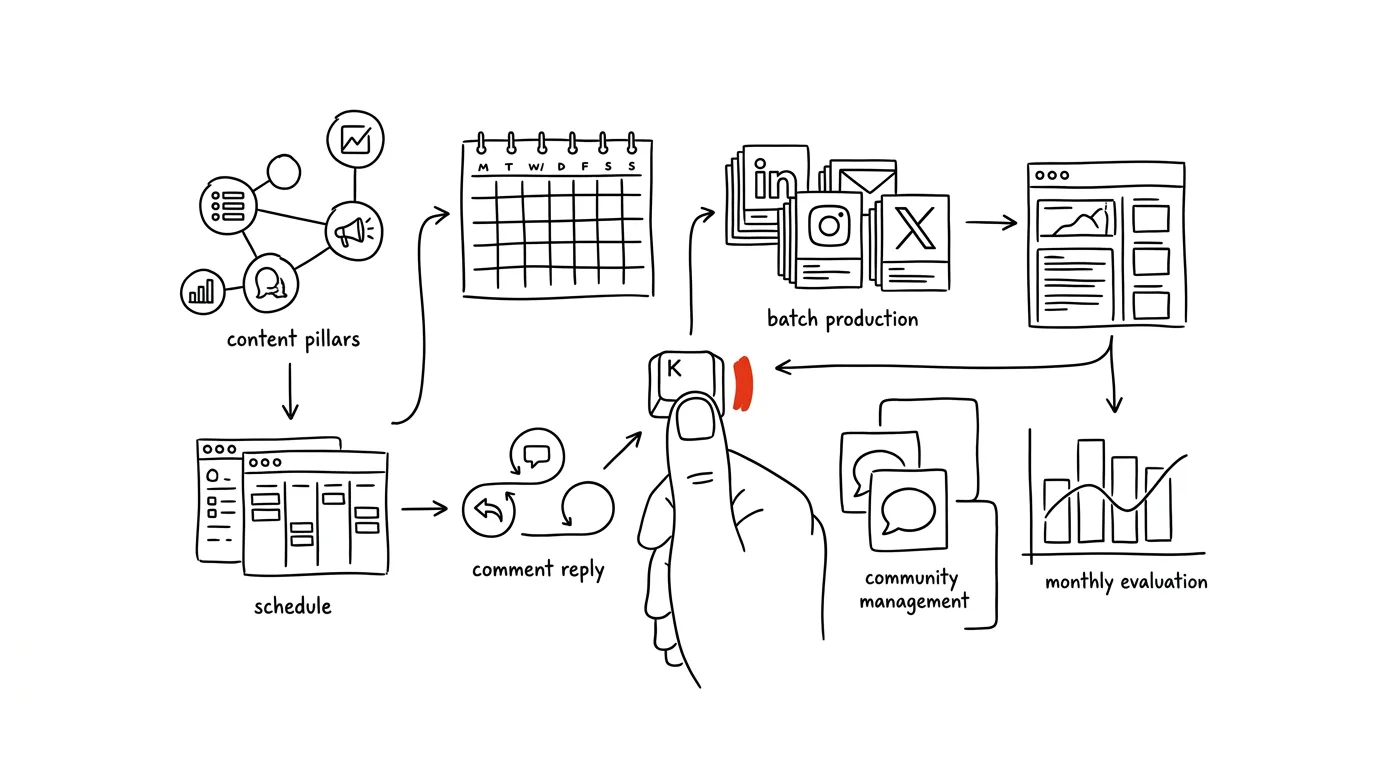
Autopilot doesn't mean a robot does it for you. It means you make the decisions once a month, batch the production into a single block, and the daily routine shrinks to ten minutes. The thumb that hits publish and replies stays yours — and that's not a limitation, it's the entire point. An account that sounds like a machine gets spotted by people faster than by the algorithm.
The guide has six phases and one cautionary chapter. Every phase comes with copy-paste prompts — just fill in the brackets. And one rule sits above everything: AI proposes, a human sends. Nothing that goes out under your name should go out without you having read it.
A typical scenario
Marek is a freelance consultant, and social media has always brought him roughly half his business. Then came a six-month stretch where work was busy, and the accounts went quiet. When he came back to them, he ran into the classic cycle: guilt on Sunday night, three posts in a row on Monday, then two weeks of silence. Comments got answered two days late, or not at all.
The change didn't start with a tool, it started with paper. Marek named four content pillars — topics he has something to say about that connect to what he sells. He wrote up a two-page description of his own voice: how he talks, what he avoids, which opinions he won't budge on. That document has lived in every chat since.
On the last Thursday of the month, he blocks off two hours. The first produces a plan for twenty posts, split across pillars and platforms. The second turns it into drafts — one topic becomes three different posts, because LinkedIn, Instagram, and X each want something different. Then he spends two hours editing it himself, because half the drafts sound like they could be anyone. Finished posts go into a scheduler and get spread across the month.
The daily routine is ten minutes each morning: go through comments, ask for a suggested reply on the trickier ones and rewrite it in his own voice, send. Once a month, half an hour with the numbers: what worked, what to do more of, what to drop. After a quarter, the result isn't a viral hit — it's a consistency he hadn't managed to hold for even a month before, and two clients who wrote in saying “I read your post about…”
Phase 1: content pillars and brand voice
This is the one phase you do once and then live off for a year. Without it, every plan is just a list of random ideas, and every AI draft sounds like a brochure.
Pillars: what you actually talk about
Content pillars are the three to five topics everything you post can be mapped onto. They work from two directions at once: they narrow the space (you're not inventing from the entire universe, just from four areas), and they keep the account consistent, so a year in, the profile makes clear what this person is about.
A good pillar sits at the intersection of three things: something you know about, something your audience cares about, and something connected to what you sell. A pillar that misses the third condition is a hobby — you can keep one of those, not four.
I'm a [role] and I do [what I do for a living] for [target
audience]. People mainly hire me because of [reason].
The questions I get asked most: [3–5 questions]
What annoys me about the field, or where I hold an unpopular
opinion: [description]
The audience I want to write for: [role, situation, what they're
dealing with]

Propose 5 variants of a content pillar set (each variant = 3–4
pillars). For each set, give me:
- the name of each pillar and one sentence on what fits in it
- 5 concrete post ideas for each pillar
- how the pillar connects to what I sell (directly, indirectly,
  builds trust)
- who in my audience it's most interesting for

The sets have to differ in angle, not just naming. At least one set
should build on my unpopular opinion. Don't give me generic topics
like “tips and tricks” — I want pillars nobody else in my field
could use.
It returns five variants, and you'll usually take pieces of two and assemble your own. The last line of the prompt is essential — without it you get “inspiration,” “behind the scenes,” and “tips,” which are categories, not pillars. Write the finished set down on paper and stick it above your desk; next month's plan gets built from it.
Putting your voice into a document
The single most useful file you can make for social media is a description of your own voice. Not because a machine needs it — you're the one who needs it, because once you have a draft in front of you, you need a way to tell that it isn't you.
Here are 10 of my texts that I think are good — this is how I want
to sound: [paste posts, emails, a piece of an article]

And here are three that didn't work and sound foreign to me: [paste]

Write me a description of my written voice, as a reference I'll
attach to every request:
1. Tone and stance — how I talk to my audience (directness,
   distance, humor)
2. Sentence and paragraph construction (length, rhythm, how I open
   and close)
3. Words and phrases I use repeatedly
4. What I avoid — words, phrases, and habits that never show up in
   my writing
5. How I handle formality, emoji, hashtags, abbreviations, numbers
6. What specifically sets those three failed texts apart from the
   good ones

Give me the output as a set of rules, not an essay about my style.
Word each rule so it could be used to check someone else's text
against it.
It returns a two-page document. Read it through and rewrite half of it yourself — the model describes how you write, not how you want to write. Add to point 4 by hand everything that irritates you on other people's profiles: “no rhetorical questions to open a post,” “no one-word paragraphs for effect,” “no stories about what a client supposedly said, when it didn't happen.” Save the finished description into a project or custom instructions so you don't have to paste it in every time.
Phase 2: a monthly plan built from pillars
The plan is what decides whether you post for a year or for three weeks. Not because it's sacred — because it removes the daily decision-making, which is the single most expensive part of publishing.
A calendar for the month ahead
A ratio that works well: most posts give value with nothing asked in return, a smaller share shows how you work, and only a small slice pitches something directly. Set the exact numbers to your own taste, but keep the pitch in the minority — an account that only sells stops getting read, and the algorithm figures that out before you do.
Here are my content pillars: [paste pillars with descriptions]
I post on: [LinkedIn 3x/week, Instagram 2x/week, X daily]
This month I want to support: [something specific — a new service,
hiring, an event, or just visibility]
What's worked for me in recent months: [paste 3–5 posts that got
traction, plus your guess at why]

Build a content plan for the month. For each slot:
- date and platform
- which pillar it belongs to
- post type (observation, how-to, case from practice, opinion,
  question, behind the scenes, pitch)
- a working title and one sentence on what the reader should get
  from it
- what I need to prepare for it (a photo, a number, a story, a link)

Rules: no more than one pitch post in five. Leave two slots empty as
a buffer for current events. Don't write the post copy itself. At
the end, list what I need to film or photograph, so I can do it in
one batch.
It returns a table you can drop straight into a calendar or a scheduler. That last line is the one that saves the most — a list of what you need in advance means you shoot once, not twenty times. Treat the plan as a proposal: shuffle slots, drop two or three ideas, and swap in your own.
Idea sources: recycling instead of inventing
The best content for social media is usually something you've already written elsewhere. Answers to frequent client questions, a slide from a deck, notes from a talk, an old article nobody read because you never shared it anywhere. Inventing from a blank page is the most expensive route there is.
Here's my [article / presentation / talk transcript / long reply
to a client]:

[paste the text]

Pull 12 post ideas out of it. For each one:
- one idea the post carries (one sentence, not a “topic”)
- which platform it fits best and why
- the opening line I'd use
- what from the original text to use as proof (a number, an
  example, a quote)

The ideas have to differ in the point they make, not just the angle
on the same one. Where the source material has a claim that would
need verifying, flag it — I don't want it going out unchecked.
It returns weeks' worth of material from something that already exists. That last paragraph is there on purpose: models like to sharpen a claim when rephrasing it (“helped” quietly becomes “doubled the results”), and the numbers you end up publishing are your responsibility.
Phase 3: batch production by platform
This is where the system saves the most time — and also where the most common mistake happens: write one piece of text and paste it everywhere unchanged. Every platform has a different audience, a different format, and different behavior.
LinkedIn: expertise without the sermon
On LinkedIn, people read in work mode and decide based on the first two lines, because the rest sits behind “see more.” What works: a specific experience, numbers, a described process, a lesson from a mistake. What doesn't: motivational posturing and so-called “broetry” — one-word paragraphs stacked on top of each other to fake depth.
Write 3 variants of a LinkedIn post.

Topic: [topic]
The one idea I want to land: [one sentence]
My concrete material — numbers, situation, what actually happened:
[paste]
Who I'm writing for: [role, what that person is dealing with]
My voice: [paste the voice description from phase 1]

Format:
- the first two lines have to work standalone as a hook (the text
  gets cut off below them), but they can't be clickbait with
  nothing behind it
- 900–1400 characters, short paragraphs, no one-word lines for
  effect
- concrete numbers and situations from my material, don't invent
  anything
- a closing question or call to action that makes sense (not
  “what do you all think?”)
- at most 3 hashtags, no emoji opening a paragraph

The variants have to differ in angle: one built on what went wrong,
one on a step-by-step process, one on an opinion part of the field
would disagree with.
It returns three drafts, and usually one is worth rewriting. Check two things: whether the model invented a detail that never happened (typically a client's name or an exact number), and whether the hook actually delivers on what the post promises — a post that promises more than it delivers damages trust faster than any reach it might gain.
Instagram: the image carries it, the text explains
On Instagram, the visual and the first line of the caption decide everything. Text is supporting, not the main message — and the formats differ too: a carousel instead of paragraphs, Stories for ongoing presence, Reels for reach beyond your followers.
Turn this topic into Instagram material: [topic, idea, my material]

Give me three things:

1) A 7-SLIDE CAROUSEL
For each slide: a headline (max 6 words), 1–2 sentences of text,
and a note on what the image should show. The first slide has to
stop the thumb; the last has to say what to do next.

2) A CAPTION
The first line as a standalone hook (the rest gets collapsed), then
3–5 short paragraphs, one call to action at the end. 10 hashtags:
a mix of niche and specific ones, no generic ones like #motivation.

3) A REELS SCRIPT under 45 seconds
A timeline by the second: what's said, what's on screen, what's in
the on-screen caption. The first 3 seconds have to give a reason
to stay.

My voice: [paste voice description]. Write in [language], no
anglicisms or borrowed phrasing I wouldn't use myself.
It returns a full package for one visual set. Read the script out loud — text written for the eye often sounds strange spoken aloud, and you'll know within ten seconds. Watch the hashtags too: models invent hashtags that don't exist or are dead, so check them in the app before you use them.
X: one idea, no filler
On X, brevity wins. Nobody reads a long opener, the format is one idea per post, or a thread where each part stands on its own. The tone runs looser and more opinionated than LinkedIn.
Turn this material into content for X: [paste topic and material]

1) 5 standalone posts, each under 280 characters, each carrying one
   idea and making sense with no added context. No openers like
   “today I wanted to reflect on.”
2) 1 thread of 6 parts: the first part has to work as a standalone
   post, each following part adds one new piece of information, and
   the last one wraps up without repeating what came before. No
   numbering like “1/6” in the text.

Rules: no hashtags, no emoji at the start, no questions asked just
to farm comments. My voice: [paste voice description].
Where my material doesn't give me enough to back up a claim, leave
it out.
It returns a week's worth of material. Check threads for one thing: whether the last part just repeats the first one in different words, which is the most common way a model “wraps up” a thread. And the general rule holds: one idea should become three different posts, not one post copy-pasted three times.
Batching: why to do it all at once
Switching between platforms costs both time and quality. Practical process: in one block, go through the whole monthly plan and generate a draft for every slot, all into a single document. Only then does the second block start — your editing pass. Don't mix the two; generating and editing use different parts of your brain, and switching between them is what stretches a two-hour job into a full day.
Save the prompts from this phase under names so you're not writing them again; the method is in the tip on a prompt library.
Phase 4: schedulers — where finished posts go
A scheduler publishes posts on a set schedule, so you don't have to be glued to your phone on Tuesday at nine. Buffer, Later, Metricool, Publer, Hootsuite, and plenty of others all do essentially the same thing at their core: connect to your accounts, let you fill a queue, and show stats in one place.
What to want from a scheduler
Four things matter. Support for your platforms — not every tool covers everything, and limits change, so check before you buy. A queue instead of individual times — set time slots once and posts drop into them, which is far faster than clicking a date for every single post. A preview — how the post will actually look once live, especially for line breaks and image cropping. And a single inbox for comments, if you get a lot of them; switching between five apps is the main reason people stop replying.
What to schedule, and what not to
The queue is for anything finished that doesn't depend on current events: pillar posts, how-tos, cases from practice, recycled content. The queue is not for reactions to current events (by the time it goes live, the context may have moved on entirely), sensitive announcements that need your presence in the comments, and anything you haven't read back to yourself.
Practical rule: a scheduled post isn't a sent email, but it's close. Time it so you're reachable in the first hour after it goes live. That first hour decides reach, and it's the only moment a post actually turns into a conversation.
Here's my monthly post plan: [paste the plan with dates and
platforms]
Audience: [description — field, role, time zone]
My normal working hours and when I'm reachable: [description]

Suggest a publishing schedule:
- specific days and times for each platform, with a reason for
  why then
- how to spread post types so the same kind doesn't run back to
  back
- which posts NOT to schedule in advance, and why
- when to leave a gap (holidays, periods when the audience isn't
  reading)

Don't present the times as fact about the algorithm — frame it as
a hypothesis I should test for a month and then adjust based on my
own numbers.
It returns a schedule you can load into your scheduler. The last paragraph matters: “best times to post” from the internet are averages across millions of accounts and say nothing about yours. After a month, you'll replace them with your own data from phase 6.
Phase 5: comments and community management
Comments are the most valuable part of social media, and also the part that eats the most attention. Replying within a few hours is the difference between a profile where people talk to each other and a bulletin board. At the same time, you can't handle it continuously all day without losing your focus.
AI proposes, a human sends
A system that works: two windows a day, morning and afternoon, ten minutes each. Simple reactions (“thanks!”, “agreed”) you handle yourself faster than typing a request would take. For longer, trickier ones, get a suggested reply — and rewrite it before it goes out.
This is a comment on my post about [post topic]:

[paste the comment]

Context: the commenter is [what I know about them], my relationship
to them is [customer / colleague / stranger].
My voice: [paste voice description]

Suggest 3 reply variants:
1. short, friendly, closes the topic
2. longer, adds a concrete piece of information or experience
3. one that asks a question back and opens up a conversation

For each, note when it's the right fit. Write the replies in my
voice, not in customer-service corporate-speak. Don't make any
concrete promises on my behalf — no dates, prices, or commitments.

If this is a comment you think I shouldn't answer myself or
publicly, say so instead of a suggestion.
It returns three variants, and sometimes a recommendation not to reply at all, which is often the right call. The last two paragraphs matter most: AI must never make promises in your name, and some comments are best handled with a private message or a phone call.
Boundaries: what a human has to own
Set these in advance, before you need them. Tested boundaries: a specific customer complaint gets handled by name, ideally fast, and outside the public thread; a field-specific question you're not sure about doesn't get answered from memory or from a chat — verify it, or say you'll get back to them; a personal attack either gets ignored or gets a single unemotional sentence, never a reaction written in the heat of the moment; and anything legal, medical, or financial belongs to whoever actually carries the responsibility for it.
Data belongs in the same category. No names, contacts, or details from confidential client work go into a chat. If you need to discuss a specific case, anonymize it and use a paid account with contractual data protection — not a free chat.
A crisis: escalate to a human
A crisis on social media is when negative reaction stops being an isolated comment and starts spreading: comments pile up, people outside your audience share it, a journalist asks a question. That's a situation where AI has no business drafting the public response — it has no context, doesn't know the legal background, and can't predict what a reaction will trigger.
What does make sense is to prepare in advance, calmly, while nothing is happening.
I work in [field] and communicate on [platforms].
The most sensitive topics in my field: [list]
The worst realistic scenario I can picture: [description]

Prepare a one-page crisis playbook:
1. How I recognize it's a real crisis and not just one angry
   comment — concrete signals, not vague terms
2. What to do in the first 60 minutes (and what NOT to do)
3. Who to inform, and in what order
4. Types of public response to never use
5. When to stay silent and when to respond
6. What to write down afterward, so I actually learn from it

Don't write finished statements for me — I'll write those myself
based on the situation. I want a decision process.
It returns a one-page process you print out and forget about until you need it. That's exactly why you build it now: in the middle of an actual crisis, nobody invents a system, everyone reaches for whatever they already have.
Phase 6: the monthly review
Without a review, you're publishing blind, and a year later you're left with a feeling that “it isn't working” without knowing why. Half an hour a month is enough.
Metrics that actually mean something
Track few numbers, but the right ones. Reach tells you how many people saw a post, but says nothing on its own. Engagement relative to reach is the ratio that shows whether the content actually landed. Saves and shares are the strongest signal of value — people share what they're not embarrassed by, and save what they want to come back to. Clicks measure interest in what you're actually offering. And new followers tied to a specific post show what's pulling in new people.
The vanity numbers, by contrast, are raw follower counts (they grow even without your input) and likes (the cheapest reaction that exists). And above every metric sits one number that shows up in no dashboard: how many inquiries mentioned they'd read something of yours. Ask about it directly, so you know what's actually earning you business.
Here are my numbers for the past month — for each post: platform,
date, pillar, post type, reach, engagement, saves, clicks:

[paste the data]

And here's the text of my three best and three worst posts: [paste]

Analyze:
1. Which pillars and post types had the best engagement-to-reach
   ratio
2. What the best posts have in common in form — length, opening,
   structure, presence of numbers or a story
3. What the weakest ones have in common
4. What pattern shows up over time (day, hour, sequence of posts)
5. Three concrete things I should do more of next month, and two
   I should stop doing

Work only with the data I've pasted, don't calculate or estimate
any missing numbers. Where the sample is too small to draw a
conclusion, say so instead of making a recommendation.
It returns a read on your own data that you wouldn't have the patience for yourself. The last paragraph is mandatory — without it, the model builds a “trend” on three posts and you redesign your whole strategy around it. Being conservative matters more than being clever here: a month is a short window, and chance does more work than it seems to.
Do more of what worked
The review has exactly one purpose: change next month's plan. Take the three things that worked and give them more slots next month. Cut the two that failed twice in a row. Leave everything else alone — constantly overhauling the plan is the same trap as doing nothing at all.
Revisit your pillars every six months. If you find one that never interested anyone, that's not a failure, it's information: replace it.
The trap: generic AI content with no point of view
The most common way to sabotage this whole system isn't laziness. It's smoothness. AI drafts are always readable, balanced, and inoffensive — which is exactly why nobody notices them. They have no author.
You can spot it by a few tells. Text that takes nobody's side: sees both sides, recommends weighing the circumstances, asserts nothing. Text with no specifics: talks about “companies” and “many cases” instead of that one Tuesday meeting where things actually turned. Text with no risk of being wrong: nothing in it could be disputed, and so nothing in it was worth writing. And text that could go out under someone else's name and nobody would notice.
The fix is simple and non-negotiable: every post needs something the model couldn't have known. A number from your own operation. A situation that happened on a Thursday. A sentence part of your field would disagree with. A mistake you made. My rule: if anyone else in the field could have written the post, it isn't worth publishing.
Here's a post draft: [paste]
Here's my voice description: [paste]

Don't rewrite it. Review it and list your findings:
1. Sentences that could sit in a post by anyone else in my field
2. Places where a general statement stands in for a specific
   example
3. Where the text dodges a clear stance the topic actually calls
   for
4. Deviations from my voice, per the attached description
5. Claims that would need verifying before I publish this

At the end, write 5 questions I should answer so the post contains
something only the author could say — my numbers, my situation,
my mistake.
It returns a list of soft spots and questions whose answers will change the post more than any stylistic edit would. Write the answers in yourself — if you had the model generate them, you'd land right back where you started. And one closing rule for this phase: verify anything factual. Models invent numbers and studies convincingly, and on social media, a falsehood spreads faster than the correction ever catches up.
Common mistakes
- One piece of text for every platform. LinkedIn, Instagram, and X have different audiences and formats; people and algorithms both spot the copy-paste, and it works nowhere.
- Publishing without reading it first. A scheduled post is the same commitment as a sent email. AI proposes, a human sends — no exceptions.
- Answering comments continuously all day. It breaks your focus and you still won't keep up. Two ten-minute windows a day beat twenty interruptions.
- Letting AI handle a crisis or an angry customer. It has neither context nor accountability. Escalating to a human is the only correct response.
- Publishing numbers and claims without verifying them. A made-up statistic in a post outruns its own correction and stays findable in search long after.
- Changing strategy after every weak post. One month is a short window and chance plays a big role; change course once something's confirmed twice.
The best tools
- Buffer, Later, Metricool, or Publer — a post queue, previews, and stats in one place; pick based on which platforms you actually use.
- An assistant with projects — your brand voice and pillars stored as persistent context, so you're not pasting them into every chat.
- A shared document for drafts — one place where the whole month gets built, and where it's visible what's finished and what's waiting on your edit.
- Each platform's native analytics — the only numbers you can trust; aggregators round them off and some metrics don't even make it through.
- A prompt library — named and saved prompts for every platform, so batch production becomes a matter of copy and paste.
What you get out of it
- Time: planning and writing that used to spill across the whole month shrinks to two blocks. Roughly two days a month, freed up for paid work.
- Peace of mind: the Sunday-night guilt disappears, because next month is already done. The decision gets made once, not thirty times.
- Consistency: the account keeps running even in weeks when you're busy — and consistency is what decides whether people connect you with your topic at all.
- Quality: the time saved on the mechanics goes into editing — the one thing that actually sets your content apart from everyone else's.
Pro tip
Start a “raw material” file and, all month long, throw into it things that actually happen: a sentence from a client, a number from a project, a mistake you made, a question that caught you off guard. Two minutes a day, dictated into your phone if that's easier. When the planning block comes around, you're not starting from nothing — you have thirty inputs nobody else has, and those are exactly what separates your profile from a machine's.
And one closing rule: the system is allowed to be automatic; the voice isn't. The moment your post could go out under someone else's name and nobody would notice, you saved time on something that shouldn't have gone out at all.
Want to go deeper? The handbook has a whole chapter on it — AI and automation.
Similar tips
In-depth guide · 76 min
AI in the company: the complete rollout guide — from data to measurable results
The most comprehensive guide on the web: how to roll out AI in a company, starting from a data foundation with metadata, through tool selection and approval, a company policy, and process automation, all the way to a self-monitoring system for meetings and projects. Over 50 prompts and templates, a 90-day plan, a sample policy — and one company that goes through the entire piece with you.
In-depth guide · 19 min
From a meeting recording to notes with tasks in a minute
A complete guide with prompts: from recording consent through cleaning up the transcript to notes that separate decisions from discussion, list tasks with who-what-deadline, and admit what's still open.
In-depth guide · 17 min
Meetings that write themselves up — down to the tasks in your task list
A complete guide with prompts for a fully automatic chain: recording and transcription, extracting who-what-deadline tasks, creating them in your task list through a connector, a searchable archive of decisions, and the rules you shouldn't turn this on without.
Was this helpful?
Liked this tip?
I send one like it every week by email. Two minutes to read, hours saved.
1 tip a week · no spam · unsubscribe in one click