Tips & tricks · AI · Everywhere · ~weeks of work
Subagents: let AI manage AI
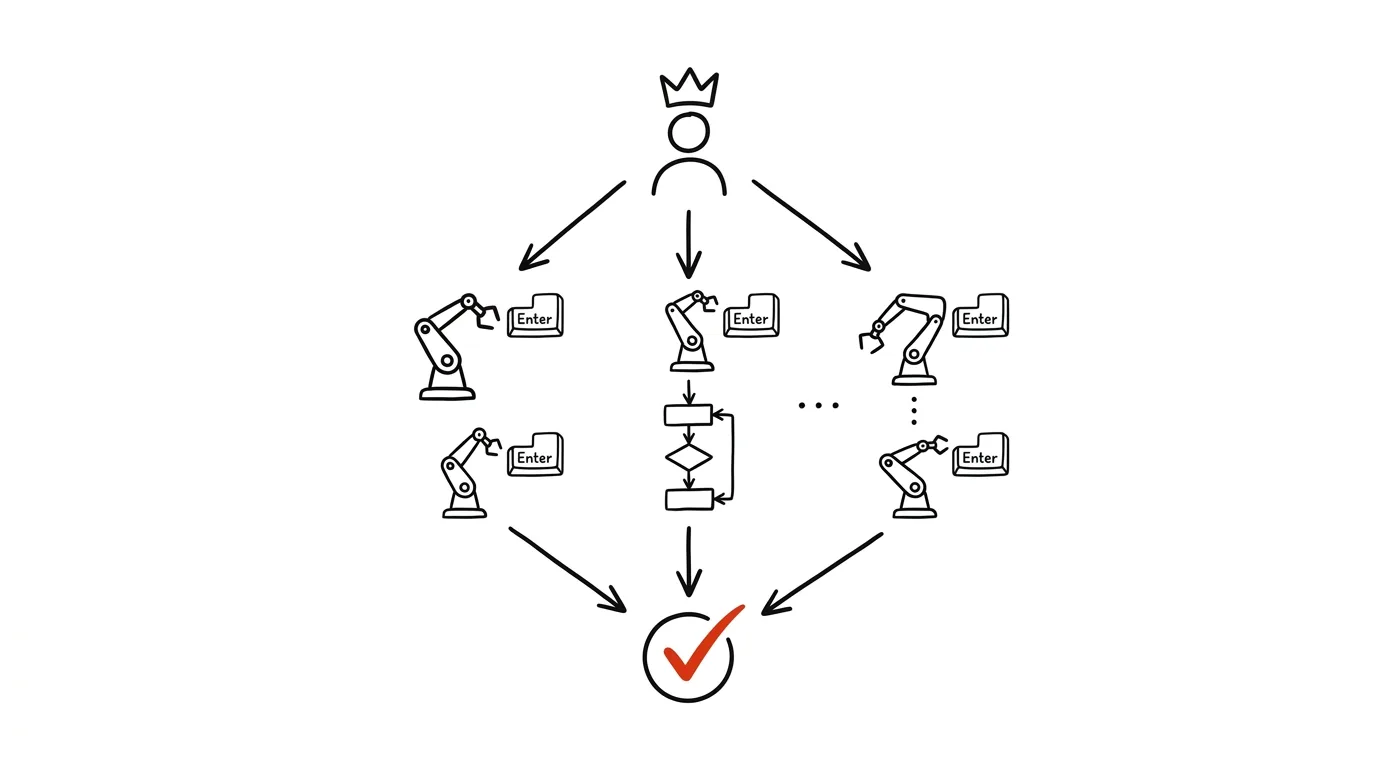
There's a ceiling you can't get past with AI in a single window. Sixty pieces of research, three hundred documents, a complete translation of an entire website — none of that fits into one conversation, and by the twentieth iteration the model has already started forgetting what you asked for at the start. The fix isn't a better prompt, it's a different way of organizing the work: one lead agent hands out the assignments, sub-agents work simultaneously, and the lead then collects and checks the results. Claude Code does this on its own.
The change is in what role you play in the work. You stop being an operator copying data into a window and back out, and become the one giving the brief: you write instructions, split the work, and approve the results. Ninety percent of the quality gets decided in a single document you write once — the instruction file. The rest is logistics.
This guide runs from the decision “is this even worth it?” through writing instructions and splitting into batches, to a check that doesn't take any longer than the work itself. Every phase has copy-ready prompts. And over all of it sits the rule that parallelization doesn't cancel out — it amplifies: AI proposes, the human approves.
A typical scenario
Tomáš, a marketing lead, has to compare sixty competing products by the end of the week: what they offer, to whom, what sets them apart, how they communicate, how they're rated. By hand, that's twenty minutes per item — twenty hours total, and that's just gathering the information, not writing up the conclusions. One at a time in a chat window isn't much better, it just makes your wrists hurt more. He won't make Friday's deadline, and he knows it.
Instead, he spends ninety minutes writing a single instruction file: exactly what to look for, what structure to record it in, what to do when information can't be found, what not to trust, what a good result looks like versus a bad one. Then he runs one agent on one company, reads the result line by line, and tightens the instructions in three places — it turns out “price” meant something different for half the companies.
Only then does he give one instruction: split the sixty items across eight agents, have each one follow these instructions, and return a filled-in table. In under an hour, the lead agent has eight sub-results collected into a single file. A QA script flags nine items with a missing field and four where the agent wasn't sure. Tomáš spends two hours reviewing it and tracks down the detail himself on five items.
Twenty hours turned into four and a half. And more importantly: the instruction file will serve him again next time — the next quarterly comparison starts eighty percent done.
Phase 1: when one agent isn't enough
Three signs a task is worth parallelizing
Orchestration isn't free — it costs you time on instructions and on review. It's worth it when a task has all three of these traits:
- A lot of uniform items. Sixty companies, three hundred invoices, a hundred texts, two hundred contracts. With ten items, the overhead outweighs the savings.
- Independence. Item number eight doesn't need to know the result of item number three. Where step B depends on the result of step A, nothing can be parallelized — that needs a sequence, not a batch.
- A describable rule. You can explain in two pages what should happen with each item and how to tell a good result from a bad one. If you can't manage that, the agents can't either.
If even one of these traits is missing, stick with a single agent. Fifty documents processed one after another by a single agent is still a massive saving over doing it by hand — that's the subject of the tip Claude Code as a personal automation engine.
Where the single-window ceiling is
Two things stop you in a single conversation. Context: the model only sees a limited slice of text, and the longer the conversation runs, the sooner the beginning drops out of it. By item twenty it no longer remembers the rules you set at the start, and the outputs start to drift. Time: sixty items done one after another take sixty times as long as one, even if each one is quick.
Subagents solve both at once. Each sub-agent gets a clean context — just the instructions and its own batch, nothing about what the others did. That's why item fifty-nine comes out just as good as item one. And because they run simultaneously, the total time is governed by the size of the slowest batch, not the sum of all of them.
There's a cost you need to know up front: agents don't know about each other. They can't confer, they can't hand off a decision, they can't see what a neighbor wrote. Anything that needs to stay consistent across the whole set — terminology, numbering, format, tone — has to be in the instructions ahead of time. This is the single orchestration rule people break over and over.
A quick test before you start
Before you start writing instructions, check that it's actually worth it. This prompt takes two minutes and will save you from wasted work more than once.
I want to process [60] items of type [item description] and
do [description of the work] for each one. By hand, I
estimate that's [20] minutes per item.

Assess whether it's worth splitting this across parallel
agents:
1. Are the items actually independent, or do some need the
   result from others? List where you see a dependency.
2. What needs to stay consistent across all the items, and
   is there a risk it drifts apart without coordination?
3. Estimate how long it would take to write instructions
   detailed enough for an agent to handle without having to
   ask follow-up questions.
4. Estimate how long checking the outputs will take.
5. Is it worth it, or should I stick with one agent? Answer
   clearly and justify it.

Be skeptical. If it's not worth it, say so directly.
You'll get back a sober assessment, including hidden dependencies you missed. Item 2 is the important one — it typically reveals that you need to standardize terminology or numbering up front, or you'll end up with sixty slightly different tables.
Phase 2: the instruction file is the whole job
Why everything rests on it
This is the one phase you have to do yourself, and the only one where quality gets decided. A sub-agent doesn't see you, doesn't see the other agents, and can't ask a follow-up question. It only has that document. Whatever's missing from it, it fills in on its own — and fifty agents will fill it in fifty different ways.
A good instruction file has six parts:
- Goal — what should exist at the end and what it's for.
- Input — what the agent receives and where to find it.
- Procedure — the steps, in the order they should happen.
- Output format — exact, including field names, order, and encoding.
- Boundaries — what's not allowed, what to do when unsure, what not to guess at.
- Examples — one correct result and one bad one, with an explanation of why.
The last item makes the biggest difference, and it's the one most often missing. An example of a bad result is worth more than three paragraphs of rules, because it shows the exact mistake agents tend to make.
Write a draft, then tighten it
The fastest path is to have a draft generated and then rewrite it. You're writing for a machine here, not a person — the instructions need to be unambiguous, not elegant.
I'm writing an instruction file for sub-agents who'll be
processing [60] items of type [description] in parallel.
Each agent will only see this file and its own batch of
items — nothing else, and it can't ask me follow-up
questions.

Goal: [what should be produced]
Input: [what the agent receives]
Output: [format, e.g. a CSV row / a .md file / a filled-in
table]

Write a draft instruction file with these sections:
1. Goal and context, in three sentences
2. The exact procedure, step by step
3. Output format down to the last detail (field names,
   order, encoding, date and number format, what to do with
   empty fields)
4. Boundaries: what not to guess at, what to never do, how
   to record uncertainty
5. One example of a correctly filled-in item
6. One example of a bad output and an explanation of what's
   wrong with it

Write it as instructions for an executor, not a description
for a human. At the end, list 10 questions that my brief
doesn't answer and that an agent would have to guess at.
Those ten questions at the end are the most valuable part of the answer. They're exactly the spots where outputs would drift — answer them and fold the answers into the file. Go through the rest of the draft with a critical eye: phrasing like “process it appropriately” means fifty different appropriate ways.
The uncertainty rule
The single most important line in every instruction file is about what an agent should do when it isn't sure. Without it, the agent fills the gap with a plausible-sounding sentence, and you only find out once it reaches a customer.
Write it in like this, impossible to miss:
THE UNCERTAINTY RULE (overrides everything else)

If you can't find a value, don't guess at it. Never fill in
a value by estimating, even when it seems “obvious.”

- leave a field blank if it can't be filled in
- in the notes column, write the reason: NOT FOUND /
  AMBIGUOUS / SOURCE UNRELIABLE
- in the confidence column, write high / medium / low
- if you're unsure about an entire item, mark it NEEDS
  MANUAL REVIEW and briefly explain why

Ten blank fields beat one made-up one. A human fills in a
blank field in a minute; a made-up one gets caught a month
later.
Copy this block into every instruction file you ever write. The “confidence” column then decides what you spend your reading time on — and that's the difference between two hours of review and two days.
Verification on a single item
Never run a batch off unverified instructions. One agent, one item, the result read line by line. Every ambiguity you catch now would otherwise repeat itself fifty times over.
Take this instruction file and process a single item with
it: [specific item].

Follow the instructions exactly, don't add anything of your
own.

Once you're done, tell me, in addition to the result:
1. which parts of the instructions were ambiguous, and how
   you interpreted them
2. what was missing from the instructions entirely
3. where you had to guess at something
4. which steps were unnecessary or overlapped
5. how long this procedure would take for 60 items

Be specific and quote the parts of the instructions you're
referring to.
You get back one finished output and a list of holes in the brief. Fix items 1 and 3 in the instructions right away. Weigh items 2 and 4 — sometimes an agent wants to add a rule that doesn't belong there. Then repeat the whole round with a second item, as different from the first as possible: most problems show up on the atypical case, not the textbook one.
Phase 3: splitting the work and running a batch
How big batches should be
Roughly five to ten items per agent and six to ten agents running simultaneously works well. Smaller batches mean more overhead collecting outputs; larger batches mean quality drifts toward the end of an agent's run — it's the same context problem, just at a smaller scale.
Split the work by something neutral (order, alphabetical), not by difficulty. And give every agent a clearly bounded area to write into, so no two of them touch the same file.
We have an instruction file [path] verified on two items,
and a list of [60] items in [path to list].

Split the work across 8 parallel agents:
- each one gets [7-8] items, following the order in the list
- each agent works strictly from the instruction file
- each one writes its result to its own file,
  outputs/batch-01.csv through outputs/batch-08.csv
- no agent may touch another agent's files, or change the
  source data

Before you start, tell me:
1. which items go to which agent
2. exactly what instructions you'll hand each agent (verbatim)
3. what you'll do if an agent fails partway through

Then wait for my approval.
Actually read item 2. It's the one moment you get to see what the sub-agents are actually being told — and sometimes you'll find that half the instructions got lost along the way. Item 3 is the safety net: a batch that fails partway through must not block the rest.
Collecting the outputs
Once it's done, the lead agent has more work than just stitching files together. Unifying and doing the first pass of filtering is its job.
All 8 batches are done. Collect the outputs from the
outputs/ folder into a single results.csv file.

Don't just concatenate them — do this:
1. check that all the batches have the same columns in the
   same order; list any mismatches
2. verify there are [60] items total and none is missing or
   duplicated
3. list items with blank required fields
4. list items marked NEEDS MANUAL REVIEW, and items with low
   confidence
5. find inconsistencies across batches: different spellings
   of the same name, different date and number formats,
   different units
6. at the end, write a summary: how many items are done with
   no caveats, how many need my attention and why

Don't fix anything yourself, just list it. Keep formatting
inconsistencies separate from content ones.
Item 5 is the reason it's worth spelling this out in this much detail. Inconsistencies across batches are a typical byproduct of parallelization — one agent wrote “$1,200,” another “1200,” a third “1.2K” — and finding them by hand would take hours.
Phase 4: checking with a script, not by reading
Why not read everything
You can read sixty outputs. Not three hundred. And more importantly: most of the mistakes you're looking for are formal ones — a missing field, a wrong format, an empty required column, a value out of range. A human is slow and unreliable at this, while a script does it in a second, and does it exactly as well the hundredth time as the first.
Split the checking into two layers. The script watches the form — structure, completeness, format, bounds, duplicates. A human watches the content — whether the result makes sense, whether an agent understood the brief differently, whether something's missing conceptually. And a human only reads a sample, plus everything the script or an agent flagged.
Write me a QA script, qa.py, that goes through the file
results.csv and reports any problems.

Checks:
1. required fields [list of fields] aren't blank
2. format: dates as YYYY-MM-DD, numbers with no thousands
   separators and a decimal point, no line breaks in text
   fields
3. values outside a reasonable range: [e.g. price below 0 or
   above 1,000,000, a date in the future]
4. duplicates in the [key field] field
5. total row count is [60]
6. items with low confidence or marked NEEDS MANUAL REVIEW
7. values that are written inconsistently within one field
   (variants of the same name)

Output: a clear list of findings, each with a row number and
what's wrong, sorted by severity. A numeric summary at the
end. The script doesn't fix anything.

Then run it and show me the result.
You'll get both the script and its first run. Keep it in the project folder — for the next batch you just rerun it, and you'll have the form check done before your coffee's ready. If it finds too many findings of one type, the problem isn't the outputs, it's the instructions: fix the instruction file and rerun the batch.
Spot-checking content
The rest is on you, and it can't be delegated. A proven ratio: spot-check ten percent of the outputs at random, plus a hundred percent of whatever the script or the agent flagged. For sixty items, that's six random ones plus thirteen flagged ones — about two hours of work.
While reading, ask three questions: did the agent understand the brief the way you meant it? Is anything missing from the answer that should be there, even though the instructions didn't explicitly call for it? And does anything look suspiciously smooth — a polished sentence with no grounding in the source is a typical byproduct of guessing. Checking facts against sources is covered in more depth in the tip fact-checking with AI.
Checkpoints: don't run everything at once
For large batches, it pays to split the work into stages with a checkpoint in between. Don't do a hundred and fifty items as one batch — do it as three rounds of fifty. After the first round you check and, if needed, adjust the instructions; after the second, only a spot check is left.
We have [300] items total. I don't want to run this all at
once.

Schedule the work into three rounds of [100] items:
- stop after each round, don't start the next one
- after each round, run the QA script (qa.py) and give me a
  summary of the findings
- after each round, give me 3 suggestions for what to tighten
  in the instruction file, based on what you saw
- only use the updated instructions for the next round once
  I've approved them

Before the first round, show me the schedule: which item is
in which round and which batch.
The suggestions for adjusting the instructions after each round are worth something in their own right. This way, the instruction file matures with every hundred items — and the next project starts with a document already proven across three hundred cases.
Phase 5: case study — 250 tips and translating a whole website
This very website is built exactly this way. Expanding to two hundred and fifty tips, plus the full English-language version, both came out of orchestration: dozens of agents ran off a single instruction file describing the format, the tone, and the hard rules. A human wrote the briefs, set the boundaries, and approved the results.
The process had four layers, all of them transferable anywhere.
One instruction file for everyone. It described the structure of a tip (what the heading is, what the typical-scenario section is, how many prompt blocks), the tone, the hard rules — how quotation marks are written, what must never appear in the text, what principles apply to sensitive data and to human approval. Without this document, two hundred and fifty pieces of text would look like two hundred and fifty different websites.
Batches of a few items each. Agents didn't get “write some tips” — they got a specific list of topics and file paths. Each one wrote to its own files, so nobody stepped on anyone else's work.
A QA script instead of reading everything. The formal side — text length, structure, an even number of code-fence markers, broken internal links, stray characters, header consistency — is watched by a script that goes through every file in a few seconds and returns a list of findings. A human then reads content, not form.
Git as the safety net. Every batch is a logged change. If one goes wrong, it's undone with a single command. Without version control, bold bulk edits like this simply wouldn't be possible.
Three transferable lessons come out of this, and none of them have anything to do with websites specifically.
A good brief written once can be used a hundred times. Ninety minutes on an instruction file is the best-invested time in the whole project. It pays off on every single item, and it's still there for you next time.
A QA script is cheaper than reading by hand, and more reliable. It catches formal mistakes with total certainty and instantly. You then only read what it flagged, plus a sample of the rest.
Checkpoints make a project manageable. Round, check, adjust the instructions, next round. Never run everything at once — not because of the technology, but because after every hundred items you learn something you couldn't have known at the start.
Phase 6: beyond the website — where else this fits
Bulk research
The most common use outside of text projects. Sixty competitors, forty suppliers, a hundred municipalities, two hundred grant programs — the same set of questions for every item, and one unified table at the end. The uncertainty rule is critical here, and so is requiring a source for every value, because this is exactly where a model is most likely to make things up.
Add a section on sources to the instruction file for research
agents. Write it so an agent can't work around it:

- every filled-in field must have a link to the specific page
  the value came from, not just the site's homepage
- a value with no traceable source doesn't get filled in
- if two sources disagree, fill in both and flag the conflict
- mark a company's marketing claims about itself as SOURCE:
  SELF-PUBLISHED, not as fact
- flag values older than [2 years] as OUTDATED
- never present a value you calculated yourself as if it came
  straight from a source

Add one example of a properly sourced row, and one example
of a row that wouldn't pass, with an explanation.
You'll get a section to drop straight into your instructions. Sourcing is the one defense that actually works for research — for a deep dive into a single topic with citations, the approach in the tip deep research is a good fit.
Processing a stack of documents
Two hundred contracts checked against a list of criteria, three hundred résumés checked against a job profile, a hundred vendor bids pulled into a comparison table. The process is the same, just with files as the input instead of a website.
The folder [path] has [200] contracts in PDF. I want to
check each one against the same list of criteria.

Write an instruction file for agents that includes:
1. a list of [12] criteria to check for in every contract:
   [notice period, penalties, automatic renewal, jurisdiction,
   confidentiality, …]
2. for each criterion: what exactly to look for, how to
   record the result (yes / no / not stated), and a
   requirement to cite the clause number in the contract
3. the uncertainty rule — never guess, mark unclear cases as
   NEEDS MANUAL REVIEW
4. an explicit ban on legal judgment: the agent describes what
   the contract says, it doesn't judge whether that's good
   for us
5. output format: one CSV row per contract

Add a warning that the output is background material for a
human, not a legal opinion.
Item 4 is there deliberately. Describing what's in a contract is work a machine can handle; judging whether it's good for you isn't. This continues in the tip reviewing a contract before you sign.
Data migration and reshuffling
A third type of task: converting hundreds of records from one format to another, unifying old spreadsheets, restructuring data. The key thing here is having a check that compares input against output — without it, you won't find out that seventeen records got lost along the way.
We're migrating [800] records from [old format] to [new
format] following the mapping in [mapping file].

Before we run any batches, write a comparison script,
compare.py, that after the migration verifies:
1. the record count on the input matches the record count on
   the output
2. every input record has a match on the output (by [key
   field]) and vice versa
3. it prints [5] randomly selected records, input and output
   side by side, so I can eyeball them
4. fields that came out blank on the output despite having a
   value on the input — that's the most dangerous case
5. values whose type or format changed

Output as a clear report with numbers. The script doesn't fix
anything. Only run the migration batches after this script
passes on a test sample of 20 records.
Item 4 is the whole reason this script exists. Silently losing a value during conversion is the most common and hardest-to-spot migration mistake — and the only thing that catches it is a field-by-field comparison of input against output.
When orchestration needs to run regularly
If the same batch repeats every month, save the instructions, the QA script, and the batch schedule into the project folder, and next time start with “do it like last time.” When the task needs to run between cloud services on a schedule, that belongs more in n8n, Make, or Zapier.
Common mistakes
- Running a batch off unverified instructions. One item up front will surface most of the ambiguities. Skip verification, and every hole in the brief repeats fifty times over, and gets fixed by hand.
- Leaving decisions to an agent that must hold consistent across the whole set. Terminology, date format, units, numbering, tone. Agents can't see each other, so each one decides differently — and you end up reconciling three hundred outputs.
- A missing uncertainty rule. Without an explicit instruction, an agent fills a gap with a plausible-sounding sentence. A human fills in a blank field in a minute; a made-up one gets caught a month later.
- Checking everything by hand. With three hundred items, you can't keep up, and by item fifty you're reading with your eyes, not your head. A script should watch the form; you read content — a sample, plus everything flagged.
- Running all three hundred items at once. Without checkpoints, you only find a systematic mistake at the end and have to redo the whole thing. Stages cost a few extra minutes and save days.
- Letting agents touch the same files. Two agents writing to one file overwrite each other's results. Each one should have its own output; the lead agent collects them.
- Forgetting that more agents means more copies of your data. The wider the batch, the more places sensitive material ends up. Anonymize before you run it, not after.
The best tools
- Claude Code — can split work across multiple parallel sub-agents and manage them; the most direct route to orchestration without building your own infrastructure.
- Projects on claude.ai — persistent context for instructions and materials that should apply to every conversation; a good home for a brief you're still refining.
- A project's CLAUDE.md file — permanent rules tied to the folder, not your memory; agents read it automatically.
- A QA script in Python — a form watchdog that goes through three hundred outputs in a second and reports only what's wrong; the tool itself will write it for you.
- Git — a safety net for bulk batches; without it, bold edits like these simply aren't an option.
- Your own prompt library — instruction files pay off when you keep and improve them, see the tip on a prompt library.
- n8n, Make, or Zapier — when orchestration needs to run on a schedule between cloud services, not on your own disk.
What you get out of it
- Time: on bulk tasks, we're not talking about minutes, we're talking about weeks. A twenty-hour research job fits into four and a half hours, most of it review. The work doesn't get twice as fast — it gets an order of magnitude faster.
- Money: work you'd have handed to an outside vendor or a temp, you can do yourself in one afternoon. And the instruction file is an asset — the next similar batch starts eighty percent done.
- Peace of mind: a huge assignment stops being intimidating. You're not dealing with three hundred items, you're dealing with one solid set of instructions and one QA script.
- Quality: every output follows the same rule, so they're comparable. Manual processing always drifts somewhere around item two hundred — an agent with a clean context doesn't.
Pro tip
An advanced move: have the QA script written before the instructions. Once you first describe how you'll know a result is correct — which fields must be filled in, which values are impossible, what has to add up — you find out what you actually want along the way. The instruction file then almost writes itself, because it's just a guide to passing the check. It's the same trick as writing tests before code, and it works for the same reason.
The closing rule that parallelism doesn't cancel out: you approve, even after the fiftieth batch. Agents can't see each other, so decisions that need to stay consistent across the whole set belong in the instructions ahead of time, not in a sub-agent's head — and nothing gets sent, published, or invoiced without a human sign-off. And watch your data: the more agents, the more copies of whatever you send them. Sensitive material (personal data, finances, health records) goes only on a paid or business account with contractual data protection, never a free chat, and anonymize whatever can be anonymized before you kick off the batch.
Want to go deeper? The handbook has a whole chapter on it — AI and automation.
Similar tips
Reply templates from your own sent mail: analysis, extraction, upkeep
A complete guide with prompts: how to safely connect your mail, have a year of sent email analyzed, find eight to ten recurring types, pull templates out of them in your own words, store them where you actually write, and clean them up once a quarter — including measuring how much time it actually saved.
From a box of business cards to a CRM table in one evening
A complete guide with 13 prompts: scan business cards into a folder, and Claude Cowork pulls out the contacts and the handwritten notes, prepares a CSV for CRM import, adds a mini company research pass, and drafts follow-up emails. A human always sends them.
From a document to a presentation in twenty minutes
A complete how-to with prompts: turning a finished report into a presentation that holds together — a slide outline before the visuals, compressing text into bullets, a clickable prototype to debug the structure, speaker notes, three versions for three audiences, and only then laying it out in the company template.
Liked this tip?
I send one like it every week by email. Two minutes to read, hours saved.
1 tip a week · no spam · unsubscribe in one click